
Jira users who have Jira Administrators global permission can create new eazyBI accounts. User who creates eazyBI account is Owner of the account. Owner has all rights for this account and also can add additional users (or user groups) to account.
拥有JRA全局中权限的JIRA用户可以创建新的EasyBi帐户。创建EasyBi帐户的用户是帐户的所有者。所有者拥有此帐户的所有权限,还可以添加其他用户(或用户组)来到此账户。
You can add access to eazyBI account to Jira users or Jira groups. Start typing user name or group name and select from auto-completion list.
您可以向Jira用户或jira组添加eazyBI帐户的访问权限。开始键入用户名或组名,并从自动完成列表中选择
eazyBI does not use the same user permission schema as Jira. All eazyBI users that have access to the account generally can access all imported information in that account, regardless of whether they have access to these data in Jira or not. Please see more details about eazyBI account management in Jira Data model documentation page.
EasyBi不使用与JIRA相同的用户权限架构。访问帐户的所有EAZYBI用户通常可以访问该帐户中的所有导入信息,而不管它们是否能够访问JIRA中的这些数据。
When you add new users or groups to account you need to specify their role:
- User admin can manage users, import source data, define calculated members and create, update and delete any reports.
- Data admin can import source data, define calculated members and create, update and delete any reports.
- Reports admin can define calculated members and create, update and delete any reports.
- User can create, update and delete own reports and view any reports and dashboard pages.
- Viewer can make new reports but can't save report for repeated usage. Viewer can view existing reports and dashboard pages.
- Dashboards viewer can only view dashboard pages.
当我们增加用户或者用户组到指定的eazyBI账户中时,通常这些用户或者用户组有以下角色:
...
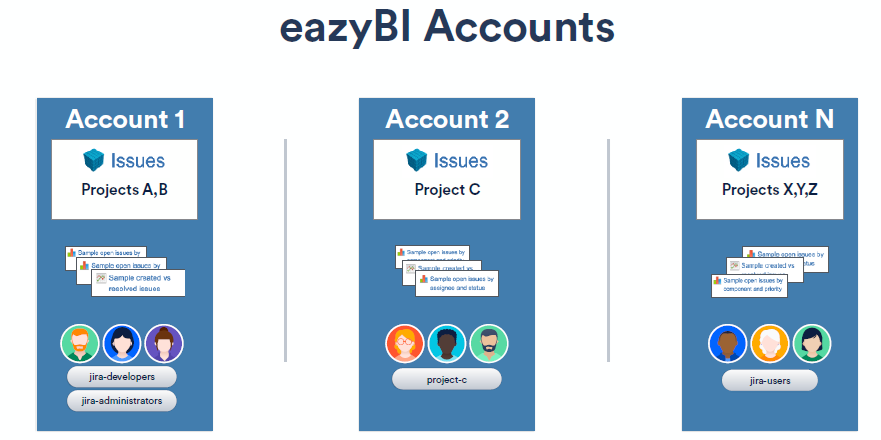
在eazybi插件中,我们可以创建一个或多个帐户。一个eazybi帐户包含一组导入的jira项目数据,这些数据可由eazybi帐户用户访问(Account Users), eazyBI账户的数据访问权限与JIRA的权限是完全分开管理的。
下图为eazyBI账户和easyBI账户的用户的关系和作用
| Panel | ||
|---|---|---|
| ||
|
账户(Account)
如果我们有多具jira项目,并且不需要限制不同jira用户组对eazybi报告的访问,那么您可以仅使用一个eazybi帐户并导入此帐户中的所有jira项目。
如果您有大量的JIRA项目和大量的JIRA问题,那么建议在每个eazybi帐户中有几个eazybi帐户和导入相关的JIRA项目集。由于每个eazybi帐户将导入的jira数据存储在单独的数据库方案表中,因此它还可以帮助eazybi报告性能优化。
账户用户(Account Users)
拥有JIRA全局中权限的JIRA用户可以创建新的EasyBi帐户(Account)。创建EasyBi帐户中的用户是帐户的所有者(Owner)。所有者拥有此帐户的所有权限,还可以添加其他用户(或用户组)来到此账户。
您可以向Jira用户或jira组添加eazyBI帐户的访问权限。开始键入用户名或组名,并从自动完成列表中选择
EasyBi不使用与JIRA相同的用户权限架构。访问帐户的所有EAZYBI用户通常可以访问该帐户中的所有导入信息,而不管它们是否能够访问JIRA中的这些数据。
账户用户角色(Account Users Role)
当我们增加用户或者用户组到指定的eazyBI账户中时,通常这些用户或者用户组有以下角色:
| 角色 | 权限 |
|---|---|
| User admin | 可以管理用户,导入源数据,定义calculated members ,并能够 创建、更新、删除任意的报告。 |
| Data admin | 能够导入源数据,定义calculated members 并能够 创建、更新、删除任意的报告。 |
| Reports admin | 能够定义calculated members and 并能够 创建、更新、删除任意的报告。 |
| User | 能够创建、更新、删除自己的报告,能够 查看任意的报告和dashboard页面. |
| Viewer | 能够查看新的报告,但不能保存;可以查看已经存的报告和dashboard页面. |
...
| Dashboards viewer | 只能查看 dashboard 页. |
...
当我们初始安装eazyBI时,作为JIRA系统管理员的几jira账户,自动拥有所有访问eazyBI账户的User admin 权限